
A mod for the TVHS Minecraft server (v2); read the README for more info
 Lucas
49fd913f2e
edited readme
Lucas
49fd913f2e
edited readme
|
8 mesi fa | |
|---|---|---|
| gradle | 8 mesi fa | |
| readme_images | 8 mesi fa | |
| src | 8 mesi fa | |
| .gitignore | 8 mesi fa | |
| LICENSE.txt | 8 mesi fa | |
| README.md | 8 mesi fa | |
| build.gradle | 8 mesi fa | |
| gradle.properties | 8 mesi fa | |
| gradlew | 8 mesi fa | |
| gradlew.bat | 8 mesi fa | |
| settings.gradle | 8 mesi fa |
README.md
TVHS SERVER MOD
This is a Minecraft mod for the TVHS Minecraft Server (v2). I have a ton of ideas of things to implement into this new era of the server, and this document should compile my progress in doing all of those things. Currently, the server is in a pre-release state, and is only for testing. ANY AND ALL DATA CAN AND MAY BE DELETED AT ANY TIME WHILE THE SERVER IS IN TESTING.
Basic Info
Version: 1.21.7 Mod Loader: Fabric
IP: tspmo.lucason.top
Mod Installation
This mod is required to be installed on both the client and the server. The easiest way to install the mod on your client is to use my Prism Launcher configuration, which contains my mod, as well as some other useful mods to have.
Steps:
Download Prism Launcher: https://prismlauncher.org/download
Log in with your Microsoft Account
Navigate to Releases - TVHS MC Server Mod and download the latest Prism Configuration (.zip)
In Prism Launcher, click Add Instance -> Import -> Browse -> Select the config you downloaded.
Play!
Alternative Installation
If you want to play with other launchers, the raw mod JAR is available in the Releases Page. To use it, simply put that JAR in your mods folder in whatever launcher you are using. Remember that the mod needs to be installed on the Fabric Mod Loader.
Other Mods
Here are some other mods that the server has installed that you might want to know about; if they are needed on the client, they are already included in my Prism Configuration:
AppleSkin - Install this mod on your client to get more info on the food you eat.
Simple Voice Chat - Install this on your client to have in-game voice chat between players.
Added Features
Hardened Blocks
These blocks can be placed, are harder to mine, and take a certain amount of direct TNT explosions to break (the TNT has to be right next to it, no splash damage). They can be picked up with the Hardened Blocks Tool, if you placed the block.
Upgraded Cobblestone
Takes 2 direct TNT explosions to break
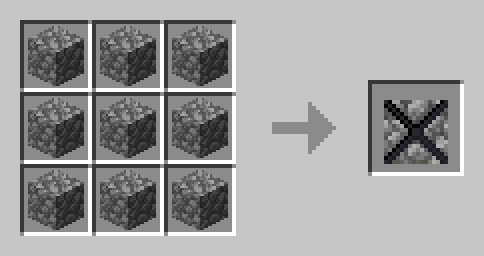
Hardened Cobblestone
Takes 10 direct TNT explosions to break
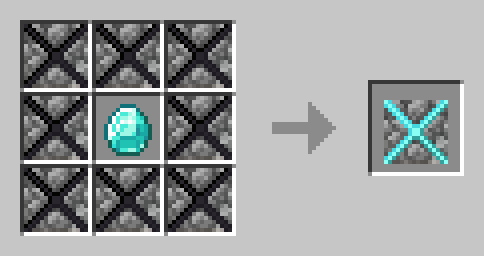
Hardened Blocks Tool
Right click any hardened block with this tool to pick it up, if you placed the block originally.
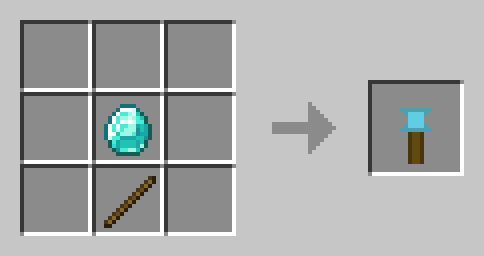
Game Rules
- No natural Regen (UHC)
Planned Features
- Hardened doors for easy access to hardened block bases
- New structures with customized loot tables
- Periodical Supply Drops to provide hotspots for PVP
- A soft 1000 block world border, in which you must build your base within, but can still explore outside of
- Server opening every day at 5:00PM and closing at 9:00PM, if you die during this time, you are dead for the rest of the session, and must come back the next day
- Players drop heads, golden heads can be crafted, heads are used to craft items to progress
- Legendary weapons similar to Hoplite
- Veinminer enchant